


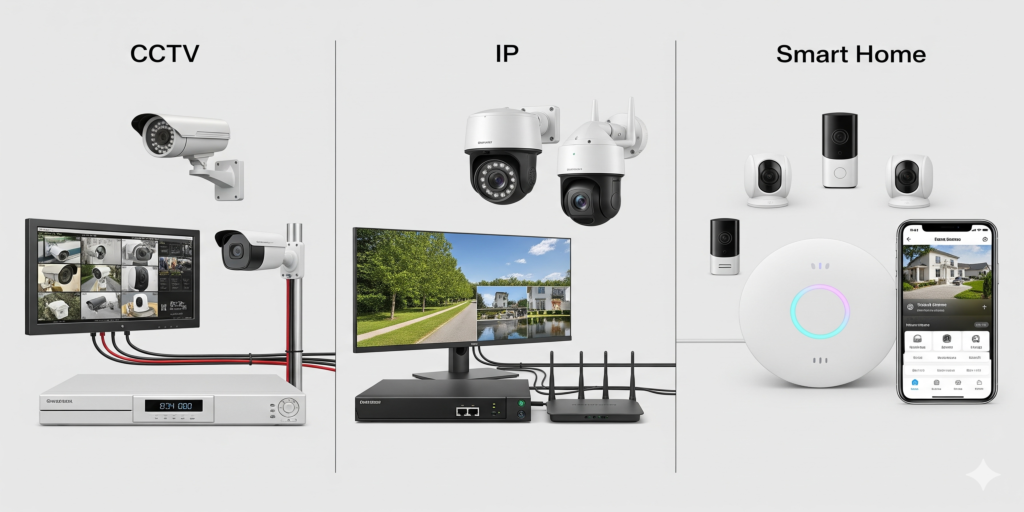
Choosing the right security system can be tricky. This guide compares CCTV, IP, and smart home solutions to help you make an informed decision.
CCTV vs IP Cameras
CCTV cameras are reliable and cost-effective for traditional setups, while IP cameras offer advanced features like remote access, AI detection, and better scalability.
Smart Home Security Systems
Smart home solutions integrate cameras, sensors, and alarms for automated monitoring. Evaluate compatibility, features, and ease of use.
Key Comparison Factors:
- Installation complexity
- Remote monitoring capabilities
- Integration with existing systems
- Cost vs features
Making the Right Choice
Analyze your specific needs, budget, and security priorities. Combine multiple solutions for a layered approach to protection.
Pro tip: Start with critical areas and expand coverage over time for optimal safety and cost-efficiency.
Surveillance system comparison at a glance
- Analog HD CCTV (coax and a DVR). Uses existing coaxial cable and stays isolated from the office network. Resolution and analytics are more limited, and cameras need separate power unless the system supports power over coax.
- IP cameras (network and an NVR). Higher resolution, one Ethernet cable for power and video with PoE, on-camera analytics and easier expansion. Every camera is a networked device, so passwords, firmware and network separation matter.
- Smart home kits (Wi-Fi and cloud). Quick to set up and easy to use from a phone. They depend on Wi-Fi quality, internet uptime and usually a subscription for recorded history, and practical coverage is a handful of cameras.
Choosing the best surveillance system for the building
The best surveillance system is the one that fits the site. For home protection, a few smart cameras plus a monitored or self-monitored alarm often cover the main entry points. A store, office or warehouse usually does better with IP cameras recording locally to an NVR, with remote viewing added on top. Buildings with good coax already in the walls can move to HD-over-coax cameras or Ethernet-over-coax adapters and upgrade without opening walls.
Put cost of ownership in the comparison too: replacement drives, per-camera subscriptions, and how long the manufacturer keeps releasing firmware.
Frequently asked questions: security system comparison
Which provides better security for smart buildings, IP cameras or traditional CCTV?
IP cameras, when they are configured properly. They deliver more detail, can encrypt video, integrate with access control and building systems, and support analytics. Because they live on the network, they belong on their own VLAN with unique passwords and current firmware; a neglected IP system can be less secure than a closed analog one.
Can I mix analog and IP cameras?
Yes. Hybrid recorders accept both, so the DVR vs NVR choice does not have to be made all at once and you can replace cameras gradually, starting with the entrances where detail matters most.
Are smart home cameras enough for a small business?
For a small office security camera setup covering two or three entry points they can be. Once you need longer retention, many cameras, or footage that survives an internet outage, a local NVR system is more dependable.
Need help with this? Compare the options with us through security camera installation or IP camera and NVR setup. If the switch is part of a remodel or move, office electronics cleanout removes the old recorder and cabling with its data handled first. Request a quote.
How do you compare security cameras to smart home security systems?
Start with what each one does. A security camera system records video, so judge it on coverage, detail at night and how long footage is kept. A smart home security system adds door and window sensors, motion sensors and an alarm, so it can react the moment a door opens instead of only recording it, but it depends on Wi-Fi, internet uptime and usually a subscription. For a house, a smart kit is often enough; a store, office or warehouse is better served by IP cameras recording to a local NVR, with sensors and alarms layered on top.
Retiring the old recorder after an upgrade
Moving from analog CCTV to IP cameras leaves an old DVR, coax adapters and camera power supplies behind, and the DVR's hard drive still holds days or weeks of footage of entrances, staff and visitors. Wipe or destroy that drive before the recorder leaves the building. The rest is ordinary office equipment disposal: in California, cameras and recorders count as electronic waste and belong with an authorized e-waste recycler, not in the trash.